
All Aboard the EventBridge Custom Bus!
Give every team its own event bus and you end up with a mess, not a mesh. Amazon's new Custom Bus lets a platform team run one shared bus with clear ownership, so you can see who consumes which events. Here’s how it differs from Classic and a phased way to move over.
Last week I was in Brisbane to talk about Amazon's new EventBridge Custom Bus. This post is a recap of my presentation for those who didn't make it to AWS Community Day Australia.
Last month AWS launched the new Custom Event Bus aka "Custom Bus". This was a significant upgrade over the OG bus, now renamed "Custom Event Bus - Classic" or in my mind "Classic Bus". The original bus has served us well, but for larger deployments the new Custom Bus has many advantages.
Let's start by exploring the differences between the two buses.
| Classic Bus (v1) | Custom Bus (v2) | |
|---|---|---|
| Payloads | JSON, rigid envelope | JSON, text, binary (CloudEvents! Avro, Protobuf) |
| Routing | 1 Rule with up to 5 targets | Subscriber with a single target |
| Transform | Output only | Input and output (JSONata) |
| Cross-account | Resource policy or bus-to-bus | RAM share; consumers own their subscribers |
| Ordering | None | FIFO per event group, per subscriber |
| Retention/replay | Archive + replay (bolt-on) | Built in, 24h to 365 days, subscriber start position |
| Dedup | No | Content based |
| Pricing | Per 64KB chunk | Per GB in + per GB out per subscriber |
| Integrations | AWS service and partner events | No partner events. Bridge from classic where necessary |
The new Custom Bus is an event platform. One team manages the bus. They use RAM to share it with other accounts or the whole organisation. Publishers are responsible for getting their events onto the bus. Subscribers have greater control over getting them off at the other end.
As at 18 October, support for the new Custom Bus in the various Infrastructure as Code frameworks is still rolling out. CloudFormation has full support, as do AWS CDK level 1 constructs and the awscc Terraform provider. The main AWS Terraform provider and CDK level 2 are still rolling out. Subscribe to the linked issues to keep up to date.
Mesh or Mess?
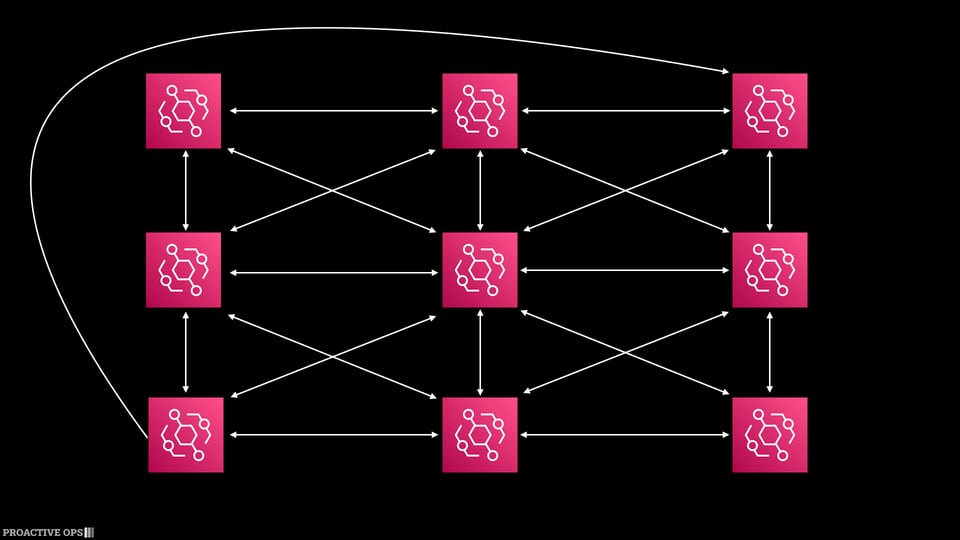
Each team owning their bus is great in theory. If they need to send or receive events from another team, they coordinate to get it set up. Over time a mesh of buses grows across the organisation. Each team controls what flows into and out of their bus.
In reality, organisations end up with a sprawling estate of buses. Discoverability is challenging. Processes vary from one team to the next. Often the end result is a mess.
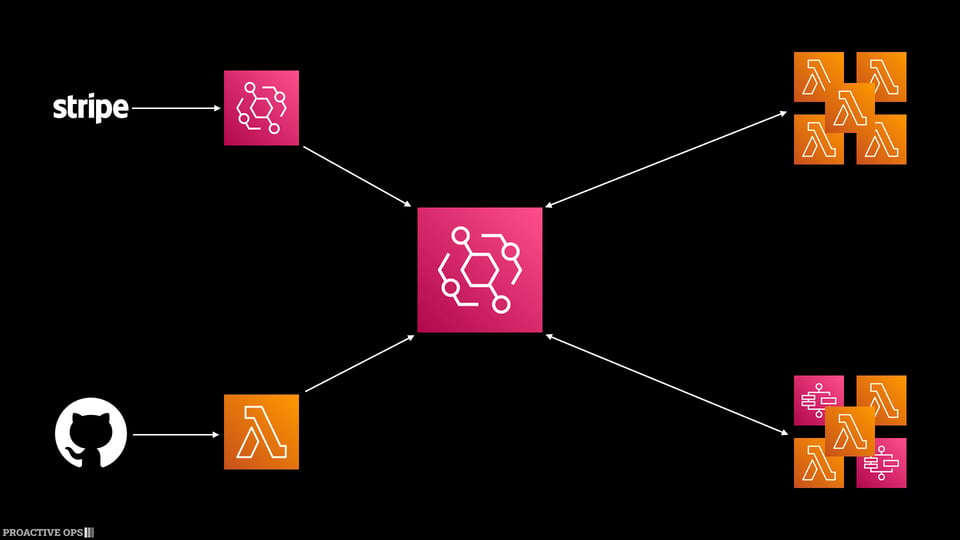
Having a centralised bus with clear ownership solves many of the problems. One team owns the bus. Every subscriber lives on that bus, so the platform team can see who consumes which events. Before a team changes their events, they know exactly who to talk to. Pair this with a catalog of the event types on the bus, whether it's the native schema registry, a third party tool, or simply a page in your developer portal. Teams now have one place to look for the events.
Simple Pricing isn't Always Cheaper
The Classic Bus pricing model of 1USD per million events sounds appealing. So long as your events are under 64KB and you know the rough number of events that pass through your bus each, month you can project the cost with a high degree of confidence.
When sending events to another bus, you pay the 1USD per million events again. While the receiver is the one deriving value from the events, it is the emitting account that pays for the events.
The new Custom Bus prices events based on the volume of data, rather than the number of events. In us-east-1, events cost 0.18USD per GB for events into the bus and 0.05USD per GB for events leaving the bus. The other key difference is that events leaving the bus are charged to the receiving account. This means the producer pays to put them on the bus, but some of the costs of consuming the events are paid by the team deriving the most value from them.
The table below shows the cost of publishing events and a single subscriber consuming each event. It is a simplified model. The pricing is based on 10 million events per month. This gives you a sense of price at scale.
| Size | Classic | Custom Bus |
|---|---|---|
| 1KB | $10.00 10M x 1 chunk x $1 / 1M |
$2.19 9.537 GB x $0.18 = $1.72 + 9.537 GB x 1 x $0.05 = $0.48 |
| 4KB | $10.00 10M x 1 chunk x $1 / 1M |
$8.78 38.14 GB x $0.18 = $6.87 + 38.14 GB x 1 x $0.05 = $1.91 |
| 8KB | $10.00 10M x 1 chunk x $1 / 1M |
$17.55 76.29 GB x $0.18 = $13.73 + 76.29 GB x 1 x $0.05 = $3.81 |
| 64KB | $10.00 10M x 1 chunk x $1 / 1M |
$140.38 610.4 GB x $0.18 = $109.86 + 610.4 GB x 1 x $0.05 = $30.52 |
| 256KB | $40.00 10M x 4 chunks x $1 / 1M |
$561.52 2 441 GB x $0.18 = $439.45 + 2 441 GB x 1 x $0.05 = $122.07 |
| 1MB | $160.00 10M x 16 chunks x $1 / 1M |
$1 960.16 (5 000 GB x $0.18) + (4 765.6 GB x $0.12) = $1 471.88 + 9 765.6 GB x 1 x $0.05 = $488.28 |
Note: All pricing in USD for us-east-1, excluding taxes. Correct as of 18 October 2026.
You'll notice the crossover point where the Classic Bus becomes cheaper is between 4 and 5KB per event. The more subscribers you have, the lower the crossover point. For example 2 subscribers per event drops it to 3.7KB per event.
Teams ingesting over 5 000 GB of events per month get volume discounts on the new Custom Bus. That's a lot of data!
Ready to Switch?
Adopting the new Custom Bus shouldn't be a big bang migration. Work in phases and do it gradually.
Assess Your Inventory
Start by getting an understanding of the buses you have deployed. Every region in every account will have the default AWS bus, but what other ones do you have? I hope they're all properly tagged so you can identify the team that owns it. If not, start there. Get your teams to tag their buses consistently.
During this assessment phase, spend the time to understand the usage patterns of each bus. If teams have large events, then they should review their events. Paying 12x the cost of a Classic Bus is a lot. Slimming the events down makes the migration worth it. If they need to remain large and are only consumed internally by their services, then teams should reconsider the need to migrate to the Custom Bus.
Similarly if you only use the default bus today or only operate a handful of buses across 1 or 2 AWS accounts, the benefits probably aren't there for you. Keep growing and the Custom Bus will be there waiting for you when you need it.
Very large organisations may need to deploy a Custom Bus per business unit. The buses should still be centralised and managed like a platform. Just having one bus to rule them all is likely to be overwhelming for the bus platform ops team. Don't go to the other extreme and create a mesh mess of interconnected Custom Buses.
There's a couple of potential gotchas to watch out for during your assessment. Custom Buses retry by default 5 times over 5 minutes, while Classic targets retry up to 185 times for 24 hours. The new default makes more sense, but can impact unreliable targets.
Today the new Custom Bus is available in 14 regions, including all US commercial regions (except us-west-1), eu-west-1 aka Ireland, eu-central-1 aka Frankfurt, ap-southeast-1 aka Singapore, ap-southeast-2 aka Sydney and ap-northeast-1 aka Tokyo. Check that the regions you use are supported.
Deploy the Platform
Now you're ready to deploy your new Custom Bus. If you have an existing common service account, deploy it in there. If you don't have a common account, today is a great day to create one. Once you've identified the account for the bus, deploy it using your preferred infrastructure as code framework.
Connect Existing Buses
It's now time to start transitioning our teams over to the new Custom Bus. We start small. Add a rule to all of your existing buses so they route all their events to the Custom Bus. We're applying platform thinking to this rollout, so there should be a terraform module, CDK construct or CloudFormation templates that teams can use to make this easy.
New Connections Subscribe
New work should connect to the Custom Bus. Discourage new cross bus routing rules. When teams need events from another bus, they should subscribe to the Custom Bus. As you tighten the screws on the policy, listen for PutTargets events and send emails to the owner of the bus when the target is another bus. Later you could consider a SCP that blocks Classic Buses as a target.
If you're taking advantage of the extended retention period offered by the Custom Bus, your subscribers can choose if they want older events replayed.
Rewire Existing Services
Work with teams using the Classic Bus to migrate their workloads to the central Custom Bus. Give them a golden path paved with high quality resources including documentation, IaC packages, and agent skills.
The Classic Bus invokes each target for each event. The Custom Bus uses batches with arrays of events. If you set MaxBatchSize to 1 then the Classic functionality of 1 event per invocation is restored. The alternative is to update your code to handle the new array format.
Remove the Legacy Connections
As workloads shift over to the new bus, remove the legacy connections. This will take time. Some teams are better resourced than others. Provide assistance to those who need it. Investing in short term assistance will pay big dividends in the medium term. Events being more accessible supports new integrations and automations.
Congratulations
By now you should have migrated to your new Custom Bus platform. You have a centrally managed bus with platform thinking that includes proper governance, better cost allocation, easier discoverability and fewer hops.
Need Help Deciding?
I’m offering an EventBridge Custom Bus adoption assessment. I map your current buses and cross-account hops, model Classic vs Custom Bus costs against your real traffic, and hand back a phased plan your team can run with. It typically takes a couple of weeks, and the plan includes a recommendation to stay on classic if that’s the right call. Get in touch if you’d like one for your organisation.


