
Meet Gata, the Automated Ticket Router for Zendesk
Triaging support tickets is very error prone work. Back in 2024 I became frustrated when my tickets were sent to the wrong team. This would often add a day to getting my issue resolved. I would later learn that the triage team only averaged around 72% accuracy. I was determined to find a way to automate this.
Gata is the result. It is an open source ticket router that runs completely within your AWS account. It is built using Amazon’s serverless, AI and Gen AI tools. It is a showcase of what is possible with intelligent automation and cloud services. While the project makes use of GenAI, the core routing feature doesn’t use an LLM.
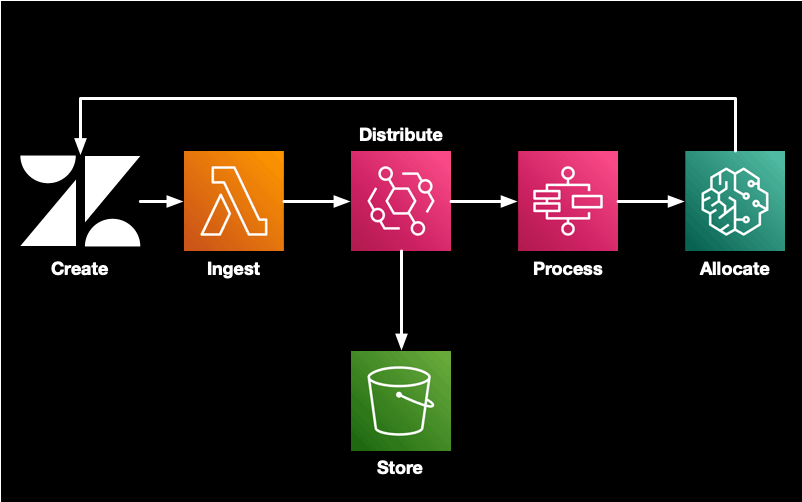
A user creates a new support ticket, Zendesk sends an event to a webhook. This event is handled by a Lambda function that puts the event on an EventBridge bus. The ticket is added to the data lake and sent to a Step Function for routing. Once a week the routing model is fine tuned using the last 3 months of ticket data. This helps keep the model accurate and performant.
While Gata demonstrates how proactive ops can be applied to ticket triage, this post is going to be a bit different to my normal content. Developing Gata has been a journey. Today I want to share that journey with you.
When I started working on this problem everyone was piling on the LLM hype train. I knew this wasn’t going to give the desired results. The overlap in team responsibilities made it difficult to craft a concise prompt. An LLM based ticket router was going to burn through tokens.
I discovered Google’s BERT model, which could be used for text classification. The internet was full of tutorials using it for sentiment analysis. With a bit of effort I was able to adapt this to pick the ticket category. Zendesk is an excellent labelled dataset. Every ticket has a category assigned to it when it is solved. I was getting low 80% accuracy. I didn’t realise at the time that this was a good score. I wanted ~95%.
As is always the case, the quality of the data was causing some issues.
Tickets get passed up an escalating chain, L1/triage to L2, then onto L3 and even engineering if required. When automating the triage process, tickets shouldn’t jump the escalation chain. I introduced mapping for these chains, so now tickets handled by engineering would initially be assigned to the L2 team.
The data set was imbalanced. 4 categories out of ~20 dominated the tickets. Many of the common techniques such as over or under sampling weren’t going to be particularly useful here. Tuning the weights was fiddly and not delivering the desired results. In the end I split the dataset. The largest classes were in the first model and everything else was sent to a second model. This improved accuracy.
I learned that some teams thought it was a good idea to spam Zendesk with notifications about their daily cronjob completing. This resulted in a lot of repetitive data, so I added a filter to remove those senders and subject lines from the training dataset. The router uses hard coded rules for those. Again, accuracy improved. Handling notifications is a topic for another day.
I was sitting at low 90% accuracy depending on the splits.
The next problem to solve was issue prioritisation. Humans triaging tickets assign a category and priority level. I wanted to ensure critical tickets are properly flagged. It is harder to use a BERT model to classify ticket priority. BERT relies on labelled training data. Tickets can start off low priority and escalate as business needs change. This makes the final priority useless. An LLM analysing the priority of the current input is more reliable for this use case. Enter Amazon’s Nova Micro model. I feed it the ticket with a prompt asking to reply with a single word, the priority - low, normal, high, critical. If it doesn’t return one of those words, I retry. This ends up being very cheap. The input tokens cost around $0.01 per 100 tickets. Constraining the output tokens results in it costing only $0.14 per million tickets.
Support agents often start by trying to find similar tickets and looking at how they were resolved. This involves searching Zendesk, which can be tedious. I added a vector store so the pipeline can do a similarity search for each ticket. It added a private note on each ticket with the 5 most similar tickets. This allows the agent to check those tickets first.
When landing on a long ticket, it can take a while to read through the history to see if it is relevant. Wouldn’t it be good if every ticket contained a concise summary? I used Amazon Nova Lite to add a summary comment on each ticket when it is resolved. This allows the agent to jump straight to the bottom of the ticket to get a sense if it is relevant. Again this is very cheap with the combined token costs being around $0.05 per 100 tickets.
All of the workflows are triggered by Amazon EventBridge events and orchestrated using Amazon Step Functions. There are no idle infrastructure costs. Everything uses the utility compute cost model. Even the inference uses SageMaker serverless. This means costs scale linearly with the number of tickets processed. The cost varies based on training frequency and ticket volume, but overall it’s a few cents per ticket routed.
Gata is packaged using Terraform. Deploying the QuickStart version should take an hour or two. You can even run it initially in simulator mode where it does everything except updating the tickets. This allows users to evaluate the performance before turning it on.
All of the Gata components are available on GitHub. The code is released under the MIT license. It consists of the terraform code to deploy the stack, and container images for data preparation, fine tuning and inference.
You’re probably wondering about the name. The Greek word for a female cat is “γάτα”. In Spanish and Portuguese it is “gata”. In all three cases it is pronounced “ya-ta”. “Yet Another Ticket Allocator”. The name was originally inspired by this cat.

Gata isn’t for everyone. It’s built for organisations handling 1000 Zendesk tickets per month. Around 80%+ of tickets should come in via email or another uncategorised channel. If this is you, then Gata may help improve your triage process. If you don’t have this volume of unstructured inflow, you may still benefit from the similar tickets and summarisation features.
I am available to assist clients deploy Gata in your environment or customise it for your needs. 🌊


